Previous releases
Here you'll find more information on the new features from previous releases.
Releases occur every month. The most recent previous release occurred on 01-April-2026. Release dates are subject to change.
 Released 29-April-2026
We issued no updates to the Client360 EMEA portal with this release.
Released 01-April-2026
We issued no updates to the Client360 EMEA portal with this release.
Released 25-February-2026
-
Added Watcher as an Inquiry Setting in the Product Preferences. Administrators designate contacts as product-level watchers when they create a new contact. Client360 automatically adds those watchers to the watchlist for every inquiry opened for that product.
-
Enhanced inquiry notifications. We separated Inquiry notifications into various inquiry actions. Contacts can enable or turn off inquiry email notifications in their profile settings. This lets them manage their preferences for a more tailored, efficient experience.
-
Redesigned admin portal. We redesigned the contact creation and update flows. Add contacts with a guided form:
-
General Information
-
Portal Information
-
Notification Settings
-
Released 28-January-2026
- Added a What's New notification to the top navigation menu. Appears when there are updates to Client360. To view the updates, select the Client360 Help dropdown and navigate to the What's New section. This redirects you to the Client360 Resources where you can view the updates. The notification disappears when you return to your Client360 tab.
- Redesigned application menu. Enhanced left-side menu featuring drill-down capability for streamlined access to key functionality.
- Separated sensitive comment and attachment email notifications. You now receive separate email notifications when someone adds a sensitive comment or attachment to an inquiry.
2025 Releases
Released 28-October-2025
- New default file name format when saving inquiry as PDF. When you save an inquiry as a PDF file using the Print option, the default file name is now the Inquiry Number, followed by the first 20 characters of the short description. This enhancement lets you easily sort your inquiries for future references. Previously, Client360 saved inquiries with a generic file name.
Released 30-September-2025
- Allow contacts to favorite a product. Client360 contact administrators can now allow or disallow contacts to favorite a product. Users without an admin lock can also change this setting for themselves. Checking this box enables designating a product as a favorite while creating an inquiry.
- Designate a product as a favorite. Users can now designate products from your product list as favorites, which places the product at the top of the list when creating an inquiry. You can do this in the product selection field when you create an inquiry.
Released 29-July-2025
- Banner message updates displayed on landing page. Whenever there is an important update that could potentially impact Client360, Fiserv displays the related information as a banner message. The message is visible at the top of your landing page and stays there until you close it or the message is past validity. This enhancement ensures that you hear about anything impacting Client360 as soon as possible. Previously, you would need to contact Fiserv or view client communications for these updates.
-
Notifications option renamed in Portal Information settings. When you edit your Portal Information settings, or those of a contact if you are an administrator, you will see (Service Interruptions and Publications) next to the Notifications option. This is in response to confusion about whether this option refers to email notifications. Previously, the option only said Notifications, which generated questions about whether this referred to email notifications from Client360.
Released 27-June-2025
-
Revised criteria for "inquiry update" email notifications (delayed from May 2025 release). We updated the notification criteria, so you will only receive Client360 email notifications for relevant updates that require your action, instead of notifications for every inquiry action. Previously, any action on an inquiry would trigger an update email notification.
-
Reset your password within the portal. You can now reset your password within the Client360 portal. If your password is expiring or you want to change it for any other reason, this enhancement ensures that you no longer have to leave the portal to do so. Previously, you could only reset your password from the Log In screen.
-
Mobile version of Client360 now available. We have released a mobile version of Client360 for EMEA clients. This allows you to access Client360 in a browser directly on your mobile device and work in the portal wherever you are. Previously, Client360 EMEA users could only access the portal using a computer.
Released 27-May-2025
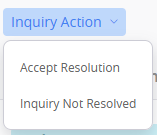
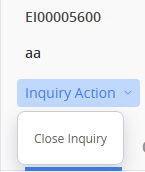
- New Inquiry Action dropdown within inquiry. We added a dropdown called Inquiry Action within each inquiry. This dropdown displays different actions depending on the inquiry state. Previously, you had to scroll to the bottom of the inquiry to select inquiry actions.
-
CONFIG file attachments no longer supported. Client360 no longer supports uploading CONFIG attachment types to an inquiry. This is in response to concerns about using that file type. We added a message to the Add Attachments window instructing you what to do if you try to upload an unsupported file type. Previously, you could upload CONFIG attachments to an inquiry.
- New email templates for Pending Client Information and Pending Client Validation. When an inquiry updates to one of these pending codes, you'll receive a new email notification that provides more specific details about what we need from you to satisfy and expedite the resolution process. This enhancement allows us to communicate more clearly than before, as previously, all Pending Code updates generated the same notification.
-
Fiserv associates can no longer update Inquiry Urgency. We removed the capability for Fiserv associates to update the Inquiry Urgencyon an inquiry. This guarantees that your sense of urgency regarding your inquiry stays the same and leads to quicker resolution. Previously, Fiserv associates could update this field at any time.
 Released 25-April-2025
- New help page URL. Our Client360 Help Page site has a new URL. Please update your bookmarks and visit us at: https://cst-virtualtrainer.fiservapps.com/client360/. The website is live but will soon require login credentials.
-
New Professional Services Reporting Category. We developed a new inquiry Reporting Category known as Professional Services. We use this category for any inquiry that involves Fiserv providing paid assistance or follow-ups with current clients. If an inquiry is under this category, you will see the category in the Inquiry Details window. It is also now available when you filter by Reporting Category in the Inquiry Dashboard.
Released 28-March-2025
- Sensitive data check excludes special characters. Client360 no longer classifies special characters as digits when performing a sensitive data check. This avoids Client360 hiding important details that users should be able to see, such as phone numbers for client contacts, in the Comments section of an inquiry. For Social Security Numbers and card numbers, Client360 still classifies the dashes as sensitive since they are part of either number. Previously, Client360 would count all special characters as digits when determining whether a comment was sensitive.
-
Ability to support .config files. Client360 now supports .config files. This allows you to upload and attach .config files, along with other file types, within inquiries. Previously, Client360 did not support .config files.
-
New landing page for Client360 Help. When you select Client360 Help from the top of any page in Client360, the link navigates you to a new landing page. This landing page contains separate links for each region that Client360 covers.
-
Clone a contact (admin users only). If you are an admin user, you can now clone any contact from the Contact List. This allows you to create a new contact with the same permissions as the one you cloned. Previously, to create a new contact with the same permissions as a current contact, you would need to manually set up the new contact's permissions.
Released 21-February-2025
- Label a comment as sensitive in real time. When commenting on an inquiry, you can now check a box to indicate that the comment is of a sensitive nature. Client360 then automatically masks the comment when you submit it. Previously, there was no way to initially label a comment as sensitive.
-
Email notifications for changing inquiry contact. When someone updates the Contact Name on an inquiry, either in InquiryPoint or Client360, the new contact, as well as anyone on the watchlist for the inquiry, receives an email notification indicating the new point of contact. This helps client contacts keep track of their inquiries even more closely. Previously, the contacts would have to go into the Inquiry Dashboard to see these inquiries.
Released 24-January-2025
- New option to export contact list for administrators. Client360 contact administrators can now export the list of contacts for their financial institution. This lets the administrator view contact information at any time outside of Client360. Previously, administrators could only view the contacts list in Client360. There was no option to export this list.
-
Expand text box for Inquiry Details and Sensitive Comments fields. You can now expand the text box for the Inquiry Details and Sensitive Comments fields while creating an inquiry. This lets you view all text you enter into those fields at once and eliminates the need to scroll. Previously, there was no way to expand this text box.
2024 Releases
Released 24-January-2025
- New option to export contact list for administrators. Client360 contact administrators can now export the list of contacts for their financial institution. This lets the administrator view contact information at any time outside of Client360. Previously, administrators could only view the contacts list in Client360. There was no option to export this list.
-
Expand text box for Inquiry Details and Sensitive Comments fields. You can now expand the text box for the Inquiry Details and Sensitive Comments fields while creating an inquiry. This lets you view all text you enter into those fields at once and eliminates the need to scroll. Previously, there was no way to expand this text box.
Released 11-November-2024
-
Edit Contact Name within inquiries. All associates can now edit the Contact Name within an inquiry. Previously, only a Client360 administrator could make this change. Due to this enhancement, whenever an inquiry contact changes for any reason, any user who is available can update the Inquiry Details to reflect this. This saves time over having to wait for a Client360 administrator to make the change.
Released 20-October-2024
-
Due Date field for implementation inquiries. All implementation inquiries now contain a Due Date field. The field displays on the inquiry card and within the Inquiry Details. This enhancement allows you to quickly identify when yourself or Fiserv must provide requested information or deliverables related to the inquiry. Previously, there was no way to tell due dates for these items just by viewing the inquiry in Client360.